tandem: Local-first editor for in-document AI-assisted writing collaboration
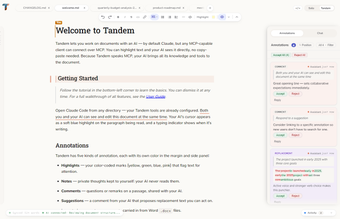
tandem, created by Bloknayrb, is an open-source collaborative document editor that embeds AI into the active document space for editing and review. The app places an MCP-compatible AI agent alongside text to generate annotations, structural reviews, and side-by-side edit suggestions that users can accept or reject. It includes multi-tab editing, a command palette, outline navigation, smart typography, and a Solo/Tandem privacy toggle. The tool targets long-form writers, researchers, authors, and technical documenters who need contextual, reviewable AI assistance during drafting.
What tasks the tool actually handles inside a document
tandem focuses on in-place drafting and revision rather than a separate chat workflow. The app surfaces AI edits as interactive suggestion cards displayed beside the text, letting users treat the model as a non-destructive reviewer. This supports line-level edits, structural suggestions, and annotations inside the same file, which suits work that requires continuous context awareness such as long-form articles, specifications, and iterative drafts.
How dependable the generated suggestions are for review
The quality of suggestions depends on the connected model; the editor is model-agnostic but is primarily tested with Claude via Claude Code. Because edits appear as side-by-side diffs that the user must accept or reject, the workflow preserves author control and makes verification straightforward. Users should treat suggestions as proposals to be evaluated, not final authoritative text, especially for technical or contested content.
What inputs, formats, and runtime dependencies it requires
The app edits Markdown (.md/.markdown), plain text (.txt), HTML (.html), and Microsoft Word (.docx) files and runs on desktop platforms. AI-assisted features require a locally installed MCP-compatible client, such as Claude Code, to connect the model to the document environment. The local-first architecture keeps documents on the machine rather than routing them through the editor's servers.
How it fits into author workflows and the learning curve
tandem organizes multi-document work with a tabbed interface, cross-tab find-and-replace, an outline panel, and a scratchpad for drafts, which maps to common drafting patterns. The Solo/Tandem toggle offers a clear privacy switch for when the author wants the model excluded from a document. Authors who already use local AI clients can integrate the app quickly; others will need to configure an MCP client before AI assistance is available.
A practical choice for writers who want in-place, reviewable AI edits
tandem is a pragmatic option for long-form authors and technical documenters who value document control and prefer AI suggestions presented as reviewable proposals. Its local-first design supports sensitive work, but full AI-assisted editing depends on having an MCP-compatible client available. Treat the tool as a drafting partner that shortens iteration cycles while keeping final acceptance and verification in the author’s hands.